• Banners Guaranteed
    • Custom Banners
    • Vinyl Banners
    • Vinyl Mesh Banners
    • Party Banners
    • Fabric Banners
    • Fence Banners
    • Outdoor Banners
    • Step and Repeat Banners
    • Pole Banners
    • Breakaway Banners
    • Large Outdoor Banners
    • Billboard Printing
    • Halloween Banners
    • Step And Repeat Fabric Banners
  • Banner Stands Guaranteed
    • Roll Up Retractable Banner Stands
    • Steppy Retractable Banner Stands
    • Non Retractable - Adjustable Banner Stands
    • Korean Style X Banner Stands
    • Adjustable X-Frame Banner Stands
    • Premium EZ Extend Banner Stands
    • L- Style Banner Stands
  • Custom Signs Guaranteed
    • Acrylic Letters And Numbers
    • Big Head Cutouts
    • Yard Signs
    • Custom Aluminum Signs
    • PVC Foam Board Signs
    • Poster Signs
    • Sintra Boards
    • Gator Boards
    • Yard Letters
    • Stainless Steel Letters and Numbers
  • Trade Show Displays Guaranteed
    • Step & Repeat Displays
        • Step & Repeat Straight Pop Up Displays
        • Step & Repeat Curved Pop Up Displays
        • Step & Repeat Adjustable Straight Displays
        • Step & Repeat Straight Wall-Box Displays
        • Straight Pillow Case Step & Repeat Displays
        • Step & Repeat Curved Pillow Case Displays
    • Backdrops
        • Custom Backdrop
        • Adjustable Backdrop Displays
        • Straight Pop Up Backdrop Displays
        • Curved Pop Up Backdrop Displays
        • Straight Wall Box Backdrop Displays
        • SEG Backlit LED Pop-Up Display
        • Straight Pillow Case Backdrop Displays
        • Curved Pillow Case Backdrop Displays
    • Table Covers & Displays
        • Stretch Table Covers
        • Fitted Table Covers
        • Premium Table Covers
        • Table Runners
  • Outdoor Displays Guaranteed
    • Canopies
        • 10 Ft Canopy Tent
        • 6 Ft Canopy Tent
        • Custom Canopy Tents 10 x 10
        • Custom Canopy Tents 10 x 20
        • Custom Canopy Tents 10 x 15
    • Flags
        • Personalized Flags
        • Rectangle Flags
        • Feather Flags
        • Teardrop Flags
        • Blade Flags
        • Sail Flags
        • Giant Flags
        • Car Flags
    • Inflatables
        • Halloween Ghost Inflatable Tube Man
        • Skeleton Inflatable Tube Man
        • Custom Inflatable Tube Man
        • Blowout Sale Inflatable Tube Man
        • Halloween Skeleton Inflatable Tube Man
        • American Flag Inflatable Tube Man
        • Now Open Inflatable Tube Man
        • Snowman Inflatable Tube Man
        • Santa Christmas Inflatable Tube Man
    • A-Frames & Sidewalk Signs
        • Metal A-Frame Signs
        • Plastic A-Frame Signs
        • Sales Metal A Frames
        • A Frame
        • Sandwich Board White
        • Sandwich Board Black
        • Open House Metal A Frames
  • Stickers and Decals Guaranteed
    • Window Decals
        • Perforated Window Decals
        • Opaque Window Decals
        • Clear Window Decals
        • Frosted Window Decals
        • Opaque Window Clings
        • Clear Window Clings
        • Window Lettering
        • Die-Cut Frosted Decals
        • Die-Cut Decals
    • Surface Decals
        • Vinyl Posters (Opaque)
        • Die-Cut Magnetic Signs
        • Magnetic Stickers
        • Wall Decals
        • Floor Decals
    • Car Decals
        • Bubble-Free Car Decals / Stickers (Opaque)
        • Truck Decals
        • Truck Magnetic Signs
        • Car Decals / Stickers (Opaque)
        • Vehicle Magnetic Signs
        • Car Decals / Stickers (Clear)
        • Vehicle Lettering
Best Of Signs Blogs
Best Of Signs Blogs > Banners > What are Low Resolution Images and How to Fix Them for Printing

What are Low Resolution Images and How to Fix Them for Printing

- BestOfSigns - September 14, 2026

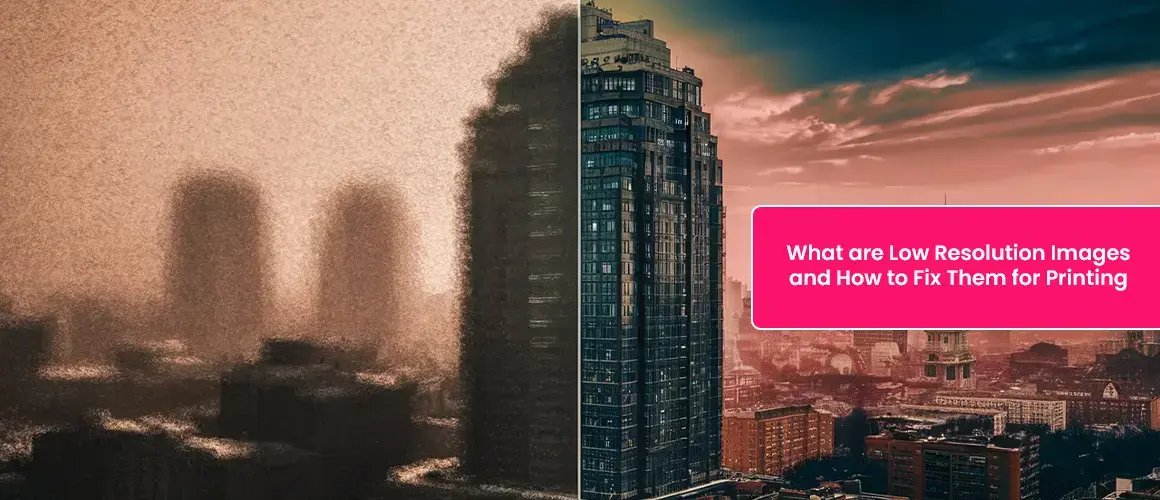
Have you ever printed a banner, poster, or sign and found that the image looked blurry or pixelated? This happens when the image is low resolution—meaning it does not have enough detail to print clearly. Images that look fine on screens may not print well because digital displays and printers work differently. Screens display images using light, while printers use tiny ink dots. If an image doesn’t have enough detail, the print version can look unclear or distorted. In this guide, we’ll explain what low-resolution images are, why they matter, how to check for resolution issues, and the best ways to fix them for high-quality printing.
What are Low Resolution Images and How to Fix Them for Printing

What Is Image Resolution? 

Image resolution refers to the amount of detail in an image. It is measured in DPI (dots per inch) or PPI (pixels per inch). 

  • DPI (Dots Per Inch) – Used for printing. A higher DPI means more ink dots are used per inch, resulting in a clearer image. 
  • PPI (Pixels Per Inch) – Used for digital images. The more pixels per inch, the sharper the image appears on screens. 

For high-quality prints, an image should have at least 300 DPI. Anything lower can result in pixelation or blurriness. 

✔️ High-Resolution Image (300 DPI or more) – Sharp, detailed, and professional-looking prints 

❌ Low-Resolution Image (Less than 300 DPI) – Blurry, pixelated, and poor-quality prints 

How to Check If Your Image Is Low Resolution 

Before submitting your design for printing, it’s important to check the image quality. Here are some easy ways to do it: 

✔️ Zoom Test – Zoom in on the image. If it looks blurry or pixelated, it’s low resolution. 

✔️ File Size Check – High-resolution images are usually larger in size. If your file is smaller than 1MB, it may not have enough detail. 

✔️ DPI Check – Open the image in Photoshop or an online DPI checker to confirm it is at least 300 DPI. 

✔️ Print Test – Print a small version on your home printer. If it looks unclear, it won’t print well at a larger size. 

How to Fix Low-Resolution Images for Printing 

If your image is low resolution, don’t worry. There are several ways to fix it and improve its print quality. 

1. Use a Higher-Quality Image 

The best way to avoid resolution issues is to start with a high-quality image. If possible, use: 

  • A good camera – A 12-megapixel or higher camera will capture sharp, detailed images. 
  • RAW format – If your camera allows it, shoot in RAW mode for the best image quality. 
  • Stock photos – Websites like Unsplash, Pexels, and Shutterstock offer high-resolution images for commercial use. 

If you’re designing something from scratch, always save your work in a high-resolution format to prevent quality loss when resizing or printing. 
Use a Higher-Quality Image

2. Use Image Editing Software to Improve Resolution 

If you don’t have a high-quality image, you can try increasing its resolution using software. Some of the best tools include: 

  • Adobe Photoshop – Go to Image > Image Size, then set the resolution to 300 DPI. 
  • Free Online Tools – Websites like Let’s Enhance, Upscale.media, and Waifu2x can use AI to improve image quality. 
  • Built-in Software – Windows Photos, Mac Preview, and GIMP have basic resizing options. 

✔️ Tip: Avoid increasing the resolution too much, as it may make the image look artificial or blurry. 

3. Convert Your Image to a Vector Format 

If your image is a logo, text-based design, or illustration, the best way to improve resolution is by converting it into a vector format. 

✔️ Vector images can be resized to any size without losing quality. They are different from regular images (raster images), which are made of tiny pixels. 

Best Vector Formats: AI, EPS, PDF, SVG 

How to Convert an Image to Vector: 

  • Use Adobe Illustrator – The “Image Trace” tool can convert raster images to vectors. 
  • Try Free Online Tools – Websites like Vectorizer.io and Inkscape can help. 
  • Use a Professional Service – If you’re unsure, BestOfSigns offers vectorization services to ensure your image is print-ready. 

Best Practices for Print-Ready Images

To ensure your images print well, follow these best practices: 

✔️ Use at least 300 DPI – Lower resolutions may look pixelated. 

✔️ Save in the right format – Use TIFF, PNG, PDF, or AI for the best quality. Avoid low-quality JPEGs. 

✔️ Set color mode to CMYK – Printers use CMYK, not RGB, for accurate colors. 

✔️ Check dimensions – Ensure the file matches the required print size. 

✔️ Include a bleed area – Extra space around the edges prevents cropping issues. 

Best File Formats for Printing 

Different file types serve different purposes. Here’s a quick guide: 

  • TIFF (Tagged Image File Format) – Best for professional printing, as it retains maximum quality. 
  • JPEG (Joint Photographic Experts Group) – Suitable for photos but loses quality when compressed. 
  • PNG (Portable Network Graphics) – Ideal for images with transparency, but not always suitable for high-quality prints. 
  • PDF (Portable Document Format) – Best for brochures, business cards, and detailed designs. 
  • AI/EPS (Adobe Illustrator/Encapsulated PostScript) – Perfect for logos and vector-based designs. 
  • PSD (Photoshop Document) – Best for editing layered designs before converting to print formats. 
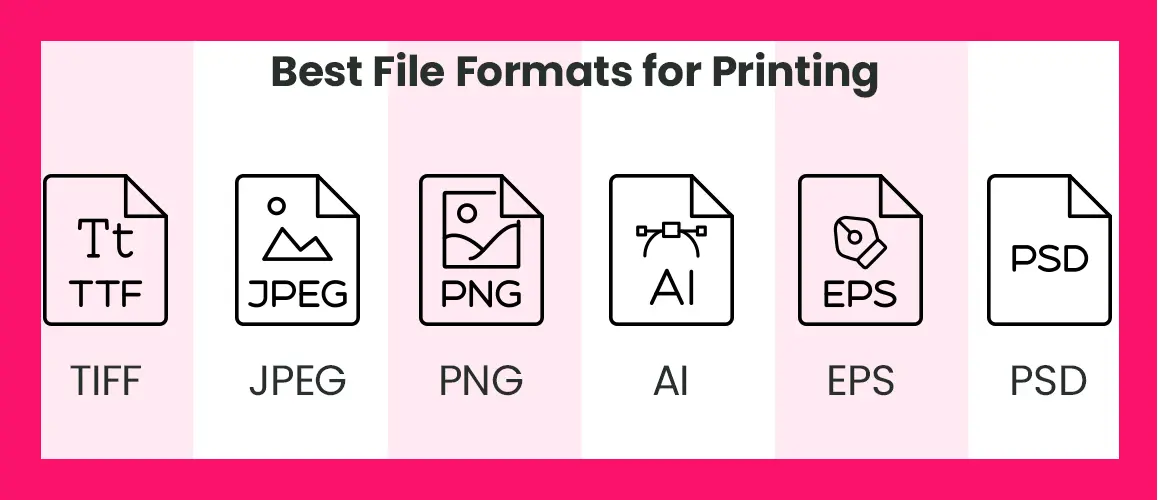
     
Best File Formats for Printing

Choosing the right format can significantly impact the final print quality. 

Common Mistakes to Avoid When Preparing Images for Print 

Even with a high-resolution image, certain mistakes can still lead to poor print quality. Avoid these common errors: 

❌ Using Web Images for Print – Most images found online are 72 DPI, which is too low for printing. 

❌ Ignoring Bleed and Margins – If you don’t leave extra space around the edges, important parts of your design may get cut off. 

❌ Saving in the Wrong Color Mode – Always use CMYK instead of RGB for print accuracy. 

❌ Compressing the Image Too Much – High compression reduces quality, so avoid over-compressing JPEGs. 

Final Thoughts 

Image resolution plays a crucial role in getting professional-quality prints. Whether you’re printing a custom banner, a business sign, or a marketing poster, using high-resolution images ensures your final product looks sharp and professional. 

If you’re unsure whether your image meets print standards, BestOfSigns offers professional vectorization and design services to ensure the highest quality prints. 

Need help preparing your artwork? Contact our team today for expert assistance.

Written By Best of Signs Editorial Team!

 0

Share This Post!

Bestofsigns Editorial Team

written By Bestofsigns Editorial Team

“We assembled our Editorial Content Team to ensure BestOfSigns delivers in-depth and practical information for the signage and custom printing community. Our team brings strong expertise across signage, custom printing, and graphic marketing. This experience allows us to provide objective insights and timely guidance to help BestOfSigns customers and small businesses make informed branding decisions.”

Previous Post
Next Post

You May Also Like

View Post
Banners 5 Steps to Create Attention-Grabbing Grand Opening Banners for Your Business

February 10, 2022

View Post
Banners The Ultimate Guide to ‘No Soliciting Signs’ and How to Effectively Use Them

August 19, 2026

8 Valentine’s Day Marketing Tips for Small Businesses
View Post
Banners 8 Valentine’s Day Marketing Tips for Small Businesses

February 11, 2025

View Post
Banners How Long Do Banners Last?

January 4, 2022

How to Create Instagram-Worthy Fall-Themed Photo Booths Backdrops with Custom Banners
View Post
Banners How to Create Instagram-Worthy Fall-Themed Photo Booths Backdrops with Custom Banners 

September 24, 2024

Outdoor Banners
View Post
Banners How to Utilize the Potential of Advertising Banners for Optimal Influence

March 18, 2024

View Post
Banners 10 Reasons you should be talking about make Your Own Happy Birthday Banners

July 21, 2014

View Post
Banners 8 Tips for Creating Eye-Catching Outdoor Banners

August 6, 2021

Blog name: No Trespassing Sign Laws: What Signs Can and Can’t Do Across All 50 States
View Post
Banners No Trespassing Signs Laws – What a Sign Can and Can’t Do In All 50 States

September 8, 2026

Categories

  • Banner Stands (23)
  • Banners (91)
  • Custom Signs (51)
  • Outdoor Displays (36)
  • Stickers & Decals (23)
  • Trade Show Displays (35)

Related Posts

  • What Is a Retractable Banner: Sizes, Uses and Design Tips
  • A Guide to Trespassing Sign Laws for Every State
  • No Trespassing Signs Laws – What a Sign Can and Can’t Do In All 50 States
  • A Complete Guide to Step and Repeat Banner Sizes
  • Labor Day Marketing Ideas for Businesses: 10 Strategies for 2026
  • Mesh vs. Vinyl Banners: Which Is Best for Your Needs?
  • A Complete Guide to Standard Vinyl Banner Sizes
  • The Ultimate Guide to ‘No Soliciting Signs’ and How to Effectively Use Them
  • Emergency Marketing Playbook: Getting Your Brand Ready When Time is Running Out
  • A Quick Guide for Time-Sensitive Promotions

Archives

Our Newsletter

Join Best of Signs family - Save 20% on your first purchase + Free Super Saver Shipping*

  • Categories

    • Banners
    • Banner Stands
    • Custom Signs
    • Trade Show Displays
    • Outdoor Displays
    • Stickers and Decals
  • Services

    • Vectorization
    • Order tracking
    • Shipping
    • Request a design expert
    • Get instant quote
  • Info

    • FAQS
    • Wallet program
    • Customer Reviews
    • Sitemap
    • Blog
  • Company

    • 48-hour express delivery
    • Contacts us
    • Privacy Policy
    • Terms of use
    • Return Policy
  • Add us on social media

    Guaranteed
scroll

© 2009-2026 Bestofsigns.com All rights reserved.